
NBI Clearance Appointment: Complete Booking Guide for Filipinos (2026)
Booking your NBI Clearance appointment is the first real step before you can hold the actual certificate in your hands. No appointment, no biometrics. No biometrics, no clearance. That is how the system works in the Philippines today, and it applies whether you are applying for the very first time, renewing an old clearance, or sorting out paperwork for a job offer abroad.
This page walks you through every part of the appointment process. When slots open, which branch to pick, what to expect on the day itself, how to reschedule if life gets in the way, and what to do if you miss your slot twice and the system locks you out. By the time you finish reading, you will know exactly what to click, what to bring, and what to avoid.
For the full new application walkthrough, see complete application guide. For renewal flow specifics, see the NBI Clearance renewal guide. For ID requirements deep dive, see requirements checklist. For fee details across all services, see fees and payment breakdown.
What an NBI Clearance Appointment Actually Is
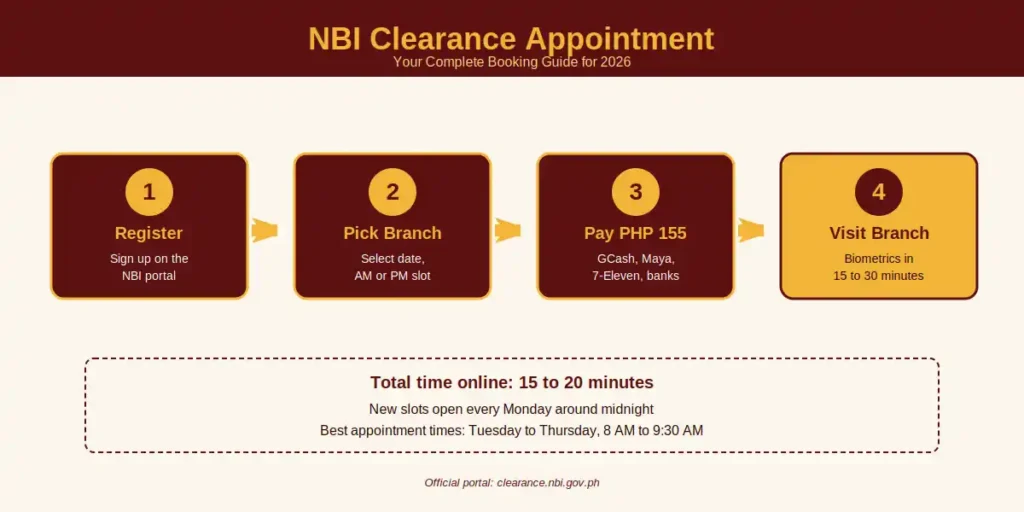
An NBI Clearance appointment is your reserved slot at a specific NBI branch on a specific date, during either the AM or PM session. You book it through the official NBI portal at clearance.nbi.gov.ph after you have registered an account and filled in your personal details.
The slot exists for one purpose. It lets the NBI biometrics team capture your photo, fingerprints, and signature in a controlled queue, instead of a free-for-all walk-in crowd. Before this system was rolled out, applicants used to line up at 4 AM hoping to be served. The online appointment fixed that.
Here is the part many applicants miss. The appointment is not optional. NBI branches will not entertain you if you walk in without a confirmed booking, except for a small group of qualified walk-ins (seniors, persons with disability, and pregnant women, covered later on this page).
Who Needs to Book an NBI Appointment
Almost every Filipino adult dealing with employment, travel, or formal transactions will need an NBI Clearance at some point. The appointment requirement applies across all applicant types.
You need to book if you fall into any of these groups:
- First-time applicants who have never held an NBI Clearance before
- Renewing applicants whose clearance has expired or is about to expire
- Job applicants asked by an employer to submit a fresh clearance
- Overseas workers (OFWs) preparing documents for deployment or contract renewal
- Travelers applying for visas that require a police record check
- Foreigners residing in the Philippines who need clearance for immigration or work permits
- Adoptive parents completing the legal adoption process
- Business owners and licensees filing for permits that ask for a clearance
- Students applying to schools or scholarships that require a clean record
If any of the above describes you, this page is the one to follow. The booking process is the same for all categories, although what you bring on the day differs slightly by applicant type (covered further down).
When to Book Your NBI Appointment
Timing is the single biggest mistake applicants make. People assume slots are always available, then panic when the calendar shows nothing but red for the next four weeks.
Slot Release Schedule
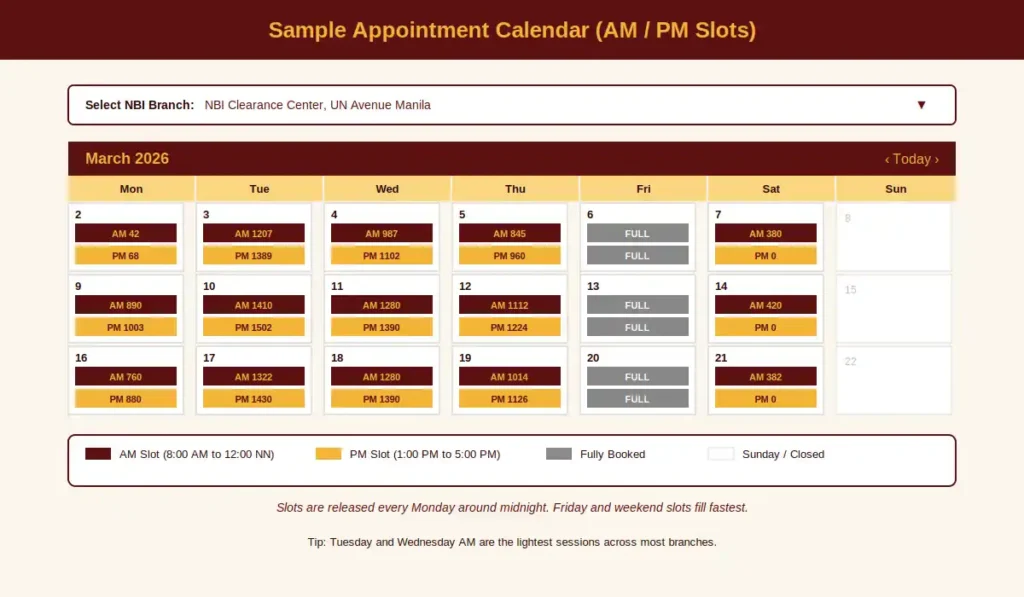
NBI releases new appointment slots in weekly batches. Fresh slots typically appear every Monday around midnight (00:00 to 02:00 Philippine time). By Tuesday morning, the most popular branches in Metro Manila (UN Avenue, Robinsons Galleria, SM Manila) are already half full. By Friday, slots for the same week and the next week are usually gone.
If you want a specific branch and a specific date, your best move is to log in late Sunday night or very early Monday morning and book before the rush.
How Far Ahead Should You Book?
The sweet spot is two to three weeks before you actually need the clearance in hand. That gives you enough buffer for:
- Same-day pickup if you are lucky (clearance ready within a few hours)
- Or the standard 5 to 10 working day wait for HIT verification or door-to-door delivery
- Plus a few extra days for rescheduling if something goes wrong
Do not book the very first available slot in panic mode. Pick a date that gives you breathing room.
Best Days and Times to Visit
Based on real applicant feedback and the way NBI branches operate:
Day of Week | Crowd Level | Notes |
|---|---|---|
Monday | Heavy | Backlog from weekend, slow systems |
Tuesday | Light | Best day overall |
Wednesday | Light to Moderate | Second-best day |
Thursday | Moderate | Still manageable |
Friday | Heavy | Worst day, payday crowds |
Saturday | Varies | Limited branches open, fills fast |
For time of day, the 8 AM to 9:30 AM window is the calmest. Staff have just opened, no payment backlog yet, system runs at full speed. By 11 AM, lunch-hour crunch begins and processing slows down.
Branch Selection: Where Should You Book?
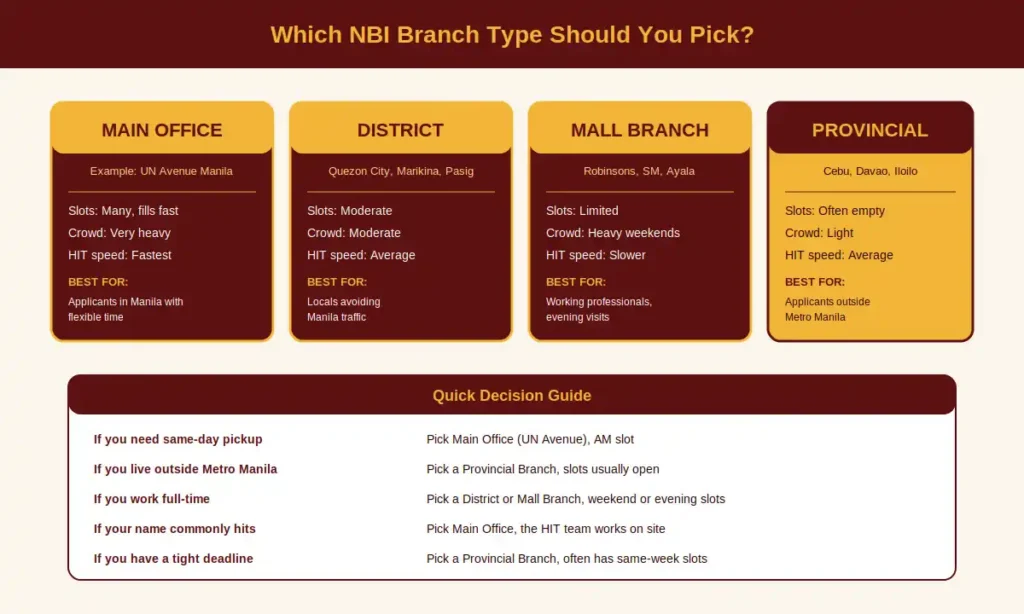
Most applicants book the nearest branch without thinking. That is sometimes a mistake. NBI branches come in four flavors, and each one has different processing speeds, queue lengths, and slot availability.
Branch Type Comparison
Branch Type | Examples | Slot Availability | Crowd | Best For |
|---|---|---|---|---|
Main Office | UN Avenue Manila | Many slots, fills fast | Very heavy | Applicants in Manila with flexible time |
District Branch | Quezon City Hall, Marikina, Pasig | Moderate slots | Moderate | Locals avoiding Manila traffic |
Mall Branch | Robinsons Galleria, SM cities, Ayala Malls | Limited slots | Heavy on weekends | Working professionals, evening visits |
Provincial Branch | Cebu, Davao, Iloilo, Bacolod, Cagayan de Oro | Often empty slots | Light | Applicants outside Metro Manila |
Strategy Tips
- Provincial branches almost always have same-week or even same-day slots. If you are visiting a province for work or family, book there.
- Mall branches close earlier, usually 5 PM. Plan around mall operating hours.
- The main office at UN Avenue is the fastest at HIT processing, since the verification team works on site. If your name commonly hits, this saves days.
- Avoid booking a branch you have to travel two hours to reach. Traffic delays cause missed appointments, and the system gives you only two strikes before locking your account.
Requirements Before You Book
Before you log in to book, gather these items. Trying to register without them will stall the form mid-way:
- Active email address that you can access (the system sends confirmation codes here)
- Working mobile number registered in your name
- Two valid government-issued IDs that you will actually bring on the day
- A clear photo of your face for the online profile (some branches still ask for this)
- GCash, PayMaya, debit card, or P155 in cash for the appointment fee
- Stable internet connection, ideally on a laptop rather than a phone
For the full list of accepted IDs and which combinations the system rejects, see [LINK: requirements-page]. You do not need to memorize it. You just need to have two valid ones ready before you start the form.
Step-by-Step: How to Book Your NBI Appointment
The booking process has eight stages. Most people finish in 15 to 20 minutes if they have their IDs and payment details ready.
Stage 1: Visit the Official NBI Portal
Go to clearance.nbi.gov.ph directly. Avoid clicking ads or links from social media, which sometimes lead to lookalike sites that harvest data. Bookmark the real URL once you land on it.
Stage 2: Register or Log In
If this is your first appointment, click Sign Up and complete the registration form. You will be asked for your email, mobile number, name details, birthdate, and a password. The system sends a verification code to your email, so make sure it is one you can actually open within five minutes.
If you already have an account from a previous application, just log in with your email and password. The system remembers your old details, which speeds things up significantly.
Stage 3: Click “Apply for Clearance”
Once inside your dashboard, find the Apply for Clearance button. The system will ask you to confirm whether you are applying as new or as a renewing applicant. Pick the one that matches your situation.
Stage 4: Complete the Personal Information Form
Fill in:
- Full name exactly as it appears on your ID (this is the part where most HIT issues start, so type carefully)
- Permanent address and current address
- Civil status, mother’s maiden name, and other family details
- Identifying marks if you have any
- Purpose of application (employment, travel, business, etc.)
- The two IDs you will present on appointment day
Double-check every field. A single typo here can flag your application as a HIT and add days to your processing time.
Stage 5: Select Your Branch and Date
This is where the calendar opens. You will see a month view with AM and PM slot counts on each day.
- Pick a branch first (calendar will not show slots until you do)
- Pick a date that works for you
- Choose either the AM session or the PM session
- Confirm your selection
Stage 6: Choose Your Payment Method
NBI accepts the following:
- GCash
- Maya (PayMaya)
- 7-Eleven (via CliQQ app)
- Bayad Center
- SM Bills Payment
- Online Banking (BDO, BPI, Landbank, Metrobank, UnionBank, and others)
- Visa or Mastercard
- Bank Over the Counter
- Shopee Pay
- DragonPay App
Pick whichever is easiest for you. GCash and Maya are the fastest because confirmation is instant.
Stage 7: Pay the Fee
The total is PHP 155 (PHP 130 base fee plus PHP 25 system service fee). For a full fee breakdown across all NBI services, see [LINK: fees-page].
After payment, save the reference number and screenshot the receipt. You will need both.
Stage 8: Save Your Appointment Confirmation
The system generates an appointment slip with your reference number, branch, date, and time. Print it or save the PDF. Some branches still ask for a printed copy. Better safe than sorry.
You will also receive a confirmation email within a few minutes. If it does not arrive in 15 minutes, check your spam folder.
Understanding AM vs PM Slots
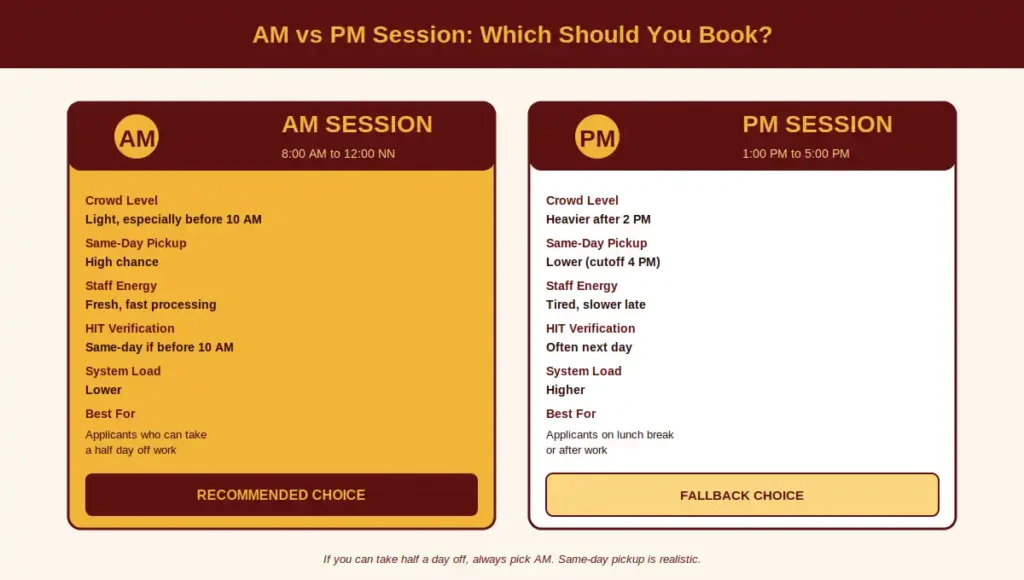
Most applicants pick whichever slot is open without thinking about the difference. There actually is a difference.
Feature | AM Session | PM Session |
|---|---|---|
Window | 8:00 AM to 12:00 NN | 1:00 PM to 5:00 PM |
Crowd | Lighter, especially before 10 AM | Heavier after 2 PM |
Same-Day Pickup Chance | Higher | Lower (cutoff before 4 PM) |
Staff Energy | Fresh, faster processing | Tired, slower toward end |
HIT Verification | Same-day if filed before 10 AM | Often pushed to next day |
Best For | Applicants who can take morning off | Applicants on lunch break or after work |
What to Do After You Book (Confirmation Email)
Right after you finish booking, you will receive a confirmation email from the official NBI system. It usually contains:
- Your full name
- Application reference number (very important, keep it safe)
- Appointment date and time slot
- Selected branch with full address
- Payment status
- The two IDs you said you will bring
- A reminder to print the slip
If the email does not arrive within 30 minutes, do the following:
- Check your spam or junk folder
- Log back into your NBI account and download the slip from your dashboard
- If still missing, email support@nbi.gov.ph with your reference number
Do not rebook or panic. Once the system has your slot, it is yours.
What Happens on Your Appointment Day
Here is what to expect from the moment you wake up to the moment you walk out of the NBI branch with your clearance or a pickup date.
The Hour-by-Hour Timeline
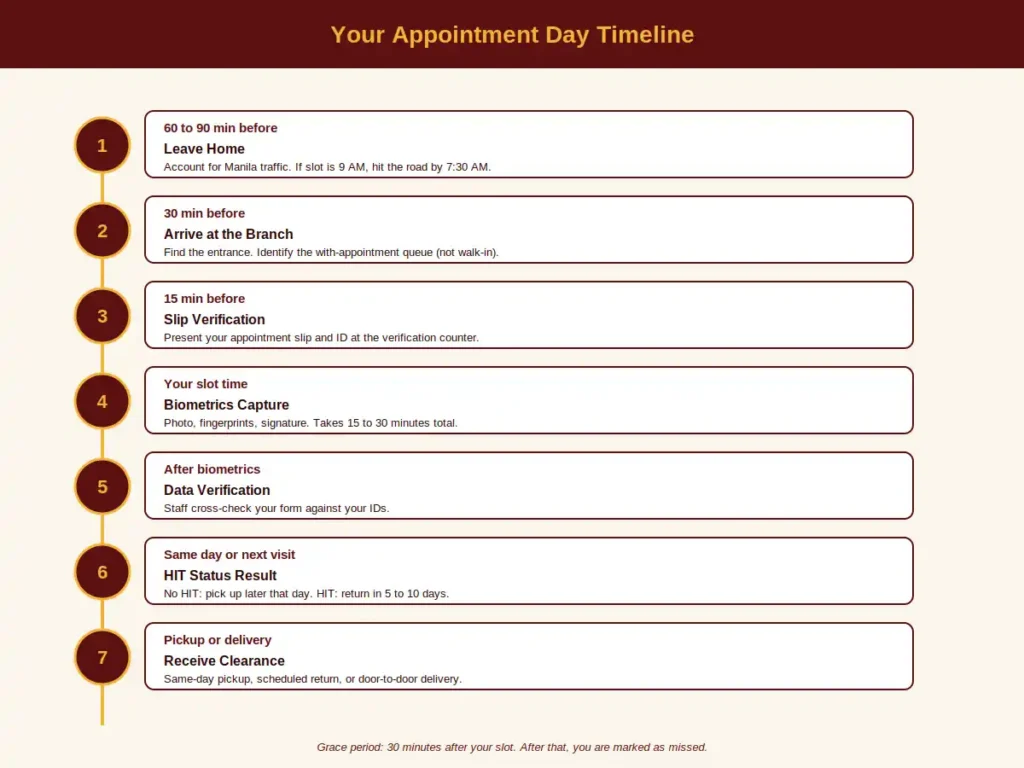
60 to 90 minutes before your slot: Leave home. Manila traffic punishes anyone who cuts it close. If your appointment is at 9 AM, you should be on the road by 7:30 AM at the latest.
30 minutes before: Arrive at the branch. Find the entrance, identify the queue for “with appointment” (do not join the walk-in line if there is one, that is for seniors and PWDs).
15 minutes before: Present your appointment slip and one of your IDs at the verification counter. A staff member will check the slip, confirm your slot, and direct you to the next queue.
Your slot time: You will be called for biometrics. This takes 15 to 30 minutes and covers:
- Photo capture (face the camera, no smiling for the standard ID photo)
- Fingerprint scanning (all 10 fingers, sometimes rolled)
- Signature capture (on a digital pad)
- Personal data verification against your IDs
After biometrics: You will be told one of three things:
- “Walang HIT, ready in a few hours” (no flag, come back later that day or pick up at a designated time)
- “May HIT, balik kayo sa…” (your name flagged something, return in 5 to 10 working days for verification)
- “Door-to-door delivery” (if you selected this option, your clearance will be couriered to your address in 5 to 14 working days)
Grace Period: How Late Can You Be?
NBI gives you a 30-minute grace period after your slot time. If your appointment is 9:00 AM, you can still be entertained until 9:30 AM. After that, you are marked as missed, which counts as a strike.
If you arrive within the AM session but past your specific slot, some branches will still squeeze you in if the queue is short. Politely ask the floor manager.
What to Bring on Your Appointment Day
This is the section that separates a smooth appointment from a wasted trip. Bring all of the following:
Universal Items (Every Applicant)
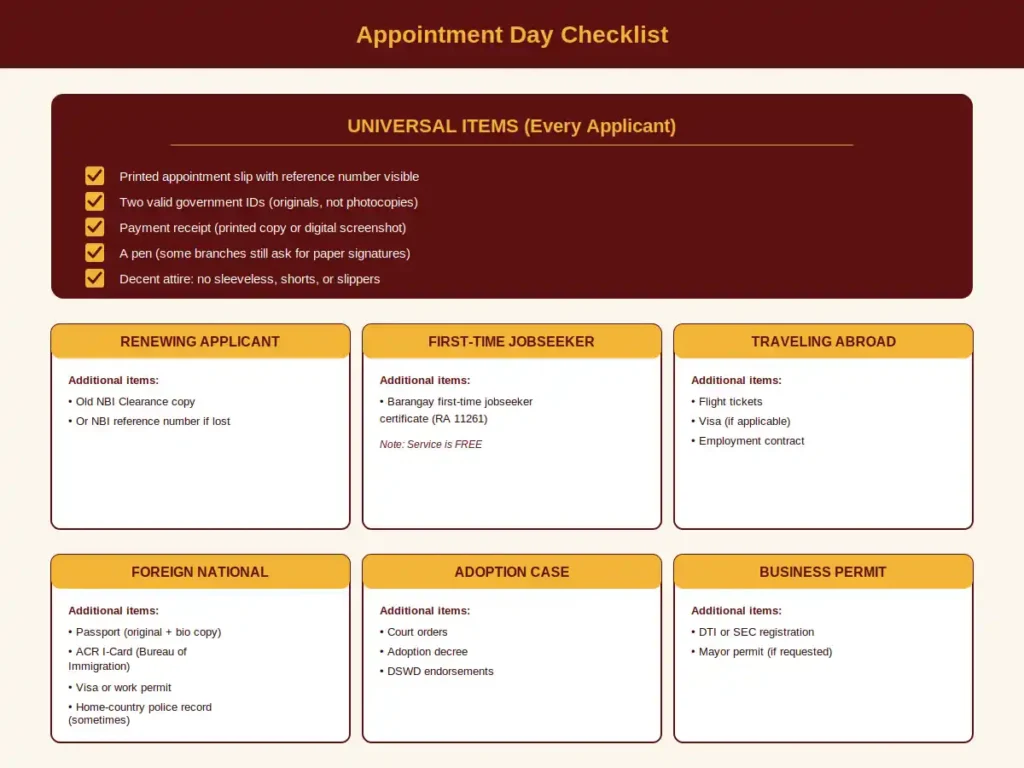
- Printed appointment slip with the reference number visible
- Two valid government IDs, original copies, not laminated photocopies
- Payment receipt (printed or digital screenshot)
- Pen (some branches still ask you to sign paper forms)
- Decent attire: no sleeveless tops, shorts, slippers, or rubber slides
Additional Items by Applicant Type
Applicant Type | Extra Documents |
|---|---|
First-time applicant | None beyond universal items |
Renewing applicant | Old NBI Clearance copy (or reference number if lost) |
Job seeker (first-time, free service) | Barangay certificate confirming first-time jobseeker status under RA 11261 |
Going abroad for work | Employment contract or job offer letter (if requested) |
Going abroad for travel | Visa, flight tickets, or travel documents |
Foreigner | Passport, ACR I-Card or Alien Certificate of Registration |
Adoption case | Court orders or adoption-related documents |
Business permit purpose | DTI/SEC registration if requested |
For the complete list of valid IDs and which ones the system rejects, see [LINK: requirements-page].
How to Reschedule Your NBI Appointment
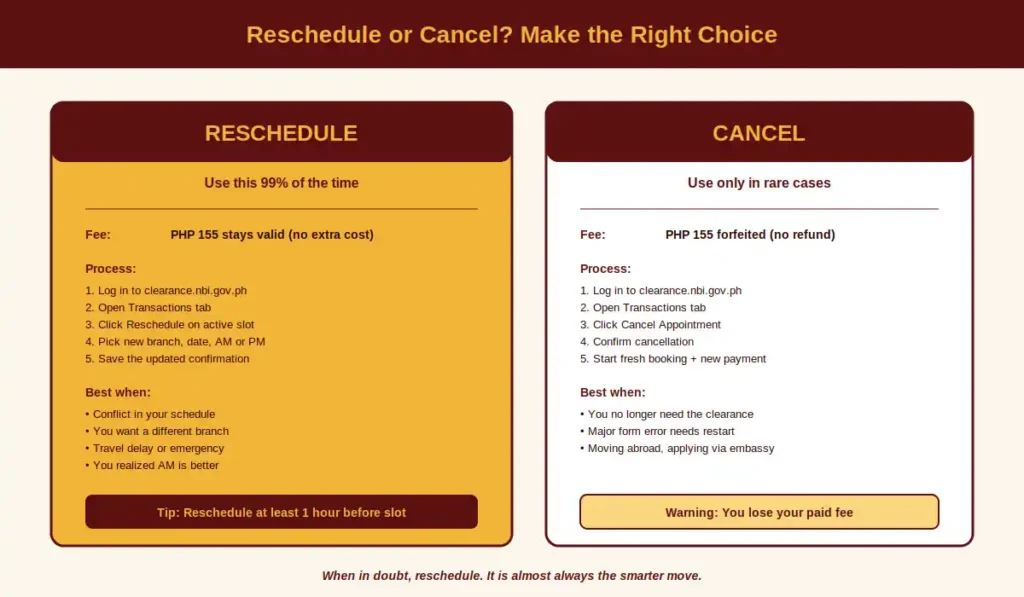
If something comes up and you cannot make your slot, you can move it to another date without paying again. Do this before your appointment time, not after.
Reschedule Steps
- Log in to clearance.nbi.gov.ph with your email and password
- Go to the Transactions tab on your dashboard
- Find your active appointment under the booked list
- Click Reschedule
- Pick a new branch (you can switch branches if needed), date, and AM or PM session
- Confirm the new slot
- Print or save the updated confirmation slip
Important Reschedule Rules
- No additional fee for rescheduling, the original PHP 155 stays valid
- You can reschedule once or twice without issues, but multiple reschedules can flag your account for review
- Reschedule at least one hour before your original slot to be safe. Some applicants report the system blocks reschedules during the slot window itself.
- Branch availability may be limited, so check the calendar first before canceling your old slot
How to Cancel Your NBI Appointment
Canceling is different from rescheduling. When you cancel, the slot is released entirely and you have to start the booking process from scratch, including a new payment.
Cancel Steps
- Log in to clearance.nbi.gov.ph
- Open the Transactions tab
- Locate the appointment you want to cancel
- Click Cancel Appointment
- Confirm cancellation when the system asks
Why You Should Reschedule, Not Cancel
In almost every case, rescheduling is the better choice. Canceling means:
- You lose your paid PHP 155 (no refund)
- You have to start the form from zero
- You have to pay another PHP 155
- You go back into the slot lottery for popular dates
Cancel only if:
- You no longer need the clearance at all
- You discovered a major error in your application that requires starting over
- You are moving abroad and will apply through the embassy instead
What Happens If You Miss Your Appointment
A missed appointment is when you do not show up within the 30-minute grace period. The system marks you absent and the slot is forfeited.
First Miss: Recoverable
Your first miss is annoying but fixable. Log back in, go to Transactions, and book a new appointment. You may have to pay the fee again depending on the branch. Some branches let you reuse the reference number for a second booking, others do not. Worth asking the help desk before paying again.
Second Miss: Account Temporarily Blocked
This is the part most applicants do not know. If you miss two appointments in a row, the NBI system temporarily blocks your account to prevent slot hoarding. Symptoms of a blocked account:
- You cannot book a new appointment
- Login works but the calendar refuses to show slots
- An error message appears when you try to schedule
How to Recover a Blocked Account
The block usually lifts after 15 to 30 days, but you can speed things up by:
- Emailing support@nbi.gov.ph with your full name, registered email, date of birth, and a short explanation
- Visiting the NBI main office at UN Avenue and asking the help desk to manually unblock your account
- Calling the NBI helpline (numbers vary by region, check the contact page)
When emailing, keep it short. Say what happened, apologize for the missed slots, and ask politely for reactivation. Most blocks are lifted within a week if you follow up.
Special Cases You Should Know About
The standard booking flow does not cover every applicant. Here are the situations that need special handling.
First-Time Jobseekers (Free Service Under RA 11261)
If this is your first time looking for work and you have never received any NBI Clearance before, you qualify for the free clearance under RA 11261 (First Time Jobseekers Assistance Act).
To claim this:
- Go to your barangay and request a Barangay Certificate stating you are a first-time jobseeker
- Visit the dedicated portal at firsttimejobseekers.nbi.gov.ph (separate from the regular NBI site)
- Register, fill out the form, and book your appointment
- Bring your barangay certificate plus the universal items on appointment day
- Pay nothing, the PHP 155 is waived
The free service is valid for one clearance only, so use it wisely.
Senior Citizens, PWDs, and Pregnant Women
By law, the following groups are entitled to walk-in privilege at select NBI branches, meaning they can skip the online appointment system:
- Senior citizens (60 years and above with a Senior Citizen ID)
- Persons with Disability (with a valid PWD ID)
- Pregnant women (with proof, usually a doctor’s note or a visible pregnancy)
- Solo parents (in some branches, with a Solo Parent ID)
Walk-ins should still bring two valid IDs and the fee. The branches that honor this include the UN Avenue main office, NBI Quezon City, and most provincial offices. Mall branches sometimes refuse walk-ins due to space limits, so call ahead.
Foreign Nationals Living in the Philippines
Foreigners residing in the country (for work, marriage, business, or long-term stay) need NBI Clearance for visa renewals, work permits, and ACR I-Card processing. The booking process is the same online, but the documents differ:
- Passport (original plus photocopy of bio page)
- ACR I-Card (Alien Certificate of Registration Identity Card) issued by Bureau of Immigration
- Visa or work permit copy
- For nationals from certain countries, an authenticated police clearance from the home country may be requested
Foreigners typically go through HIT verification because their names are not in the standard Filipino database. Plan for 5 to 10 working days, not same-day pickup.
Booking on Behalf of Someone Else
You cannot book for another adult under their name without their full cooperation, since the appointment requires their email, mobile number, and biometrics.
For minors (under 18 applying for clearance, usually for travel or adoption), a parent or guardian can:
- Help register the account using a guardian email
- Complete the form for the minor
- Accompany the minor on appointment day with the parent’s own ID plus the child’s birth certificate
For elderly relatives who cannot use a computer, you can sit with them and book on their behalf, but they must physically attend the biometrics appointment. There is no remote biometrics option except for OFWs through Philippine embassies abroad.
Multiple Appointments
Each NBI account can have only one active appointment at a time. You cannot book two slots as a backup. If you try, the system will flag the second booking and may temporarily lock your account for suspicious activity.
If you need clearances for multiple family members, register a separate account for each adult.
Common Issues and How to Fix Them
Even with the best preparation, things go wrong. Here are the issues applicants run into most often, with practical fixes.
Issue 1: No Available Slots for Weeks
What you see: The calendar shows nothing but greyed-out dates for your preferred branch.
Why it happens: The branch has reached its monthly capacity, or you are checking on a Friday when the week’s slots are already taken.
How to fix it:
- Try logging in on Sunday night or Monday morning when new slots open
- Switch to a nearby branch with similar travel distance
- Consider a provincial branch if you have a trip planned
- Check at off-peak times like late evening, slots sometimes get freed up by cancellations
Issue 2: Payment Not Reflecting
What you see: You paid but the system still shows “Unpaid” or the appointment is not confirmed.
Why it happens: Payment gateways need 1 to 24 hours to sync with the NBI system, especially for over-the-counter and bank deposits.
How to fix it:
- Wait 24 hours before raising a ticket
- Keep your payment reference number and receipt screenshot
- If still unpaid after 24 hours, email support@nbi.gov.ph with the reference number and proof of payment
- Avoid paying twice, you may not get a refund for the duplicate
Issue 3: “HIT” Message on Your Name
What you see: A red flag or HIT status appears after your biometrics.
Why it happens: Your name (or a close variation) matches an existing entry in the NBI database, usually a pending case, a namesake with the same birthdate, or a typo in your form.
How to fix it:
- Wait for the verification team to review (5 to 10 working days)
- Bring supporting documents (birth certificate, marriage certificate, additional IDs) to clear up identity confusion
- Follow up at the same branch, do not rebook elsewhere
For a deeper guide on handling HITs, see [LINK: hit-guide].
Issue 4: Technical Errors or Site Crashes
What you see: The website hangs, returns errors, or refuses to load.
Why it happens: High traffic, usually on Monday mornings and lunch hours.
How to fix it:
- Clear your browser cache and cookies
- Try a different browser (Chrome, Firefox, Edge)
- Use a laptop instead of mobile, the desktop version is more stable
- Try off-peak hours (early morning, late evening)
- If urgent, switch to mobile data instead of WiFi
Issue 5: Wrong Personal Information on the Form
What you see: You realize you typed your name wrong, or your birthdate has a typo, after payment.
Why it happens: Rushed filling, autocomplete errors, or using shortcuts.
How to fix it:
- Minor typos can be corrected on appointment day, bring two IDs that show the correct details
- Major errors (wrong name spelling, wrong birthdate) may require a fresh application
- For full name corrections, see [LINK: name-correction-guide]
- Always double-check the form before paying
Issue 6: Email Confirmation Never Arrives
What you see: You completed booking but no email reached your inbox.
Why it happens: Spam filters, typo in your email, or NBI server delays.
How to fix it:
- Check spam, promotions, and junk folders
- Log in to your NBI dashboard and download the slip directly
- If the email on file is wrong, contact support to update it
Issue 7: Account Blocked After Two Missed Appointments
Already covered above under “What Happens If You Miss Your Appointment.”
Tips for a Hassle-Free NBI Appointment
Here are the small habits that separate a one-trip clearance from a three-trip nightmare.
- Book early, two to three weeks before you need the clearance. Last-minute booking puts you in a slot panic.
- Pick AM, Tuesday to Thursday. This combination has the shortest queues and the freshest staff.
- Triple-check your form before paying. Most processing delays come from typos.
- Save your reference number in three places. Email, screenshot, written on paper.
- Bring exact change or a fully topped-up GCash. Some branches do not accept onsite payment.
- Eat breakfast before going. Biometrics queues can run an hour past your slot, and there is no food inside most branches.
- Bring a power bank. Your phone will run hot from checking the queue, the slip, and replying to work messages.
- Dress conservatively. Closed shoes, sleeved top, full-length pants or knee-length skirt. Some branches turn away applicants in shorts or slippers.
- Treat the staff politely. They handle hundreds of stressed applicants daily, and a calm tone often gets you faster help than complaints do.
- Print the slip even if the email says digital is fine. Some branches still ask for paper.