NBI Clearance Verification: How to Check If a Clearance Is Real (2026 Guide)
When you hold an NBI Clearance in your hands, or one lands on your desk from a job applicant, the next question is the obvious one: is this real? Filipinos lose jobs, landlords lose rent, and employers face liability when a fake clearance slips through. The good news is that verifying an NBI Clearance takes less than a minute, costs nothing, and can be done on any phone.
This page covers every way to verify an NBI Clearance in 2026. The QR code scan, the online portal lookup, the physical security features built into the paper, the red flags that signal a forgery, and what employers, landlords, and applicants should each do. By the end you will know exactly how to tell a genuine clearance from a fake one, and what to do if your own clearance does not check out.
For the application process, see complete application guide. For the renewal flow, see the NBI Clearance renewal guide. For document requirements, see the requirements checklist.
What NBI Clearance Verification Actually Means
When someone says “verify the NBI Clearance,” they are checking three things at once:
- The document is authentic. The clearance was actually issued by the National Bureau of Investigation, not printed by a fixer or made up in Photoshop.
- The clearance is still valid. It has not expired (NBI Clearances are valid for one year from the date of issue).
- The identity matches. The person holding the clearance is the same person whose name, photo, and details appear on it.
A clearance only certifies that, as of its issue date, the holder had no pending criminal complaint or conviction on record. The one-year validity exists because that snapshot can change. Verification confirms the snapshot still holds true today.
Who Needs to Verify a Clearance
Verification is not only for employers. Several groups regularly need to confirm a clearance is genuine:
- Employers screening new hires, especially for roles in security, finance, healthcare, child care, or government
- Landlords doing background checks on potential tenants
- Embassies and consulates processing visa applications
- POEA-accredited agencies vetting overseas Filipino workers
- Schools and universities processing student or staff applications
- The applicant themselves to confirm there are no typos in name, birthdate, or other details before submitting the clearance to a third party
If you fall into any of these groups, the verification process below applies to you.
The Three Ways to Verify an NBI Clearance
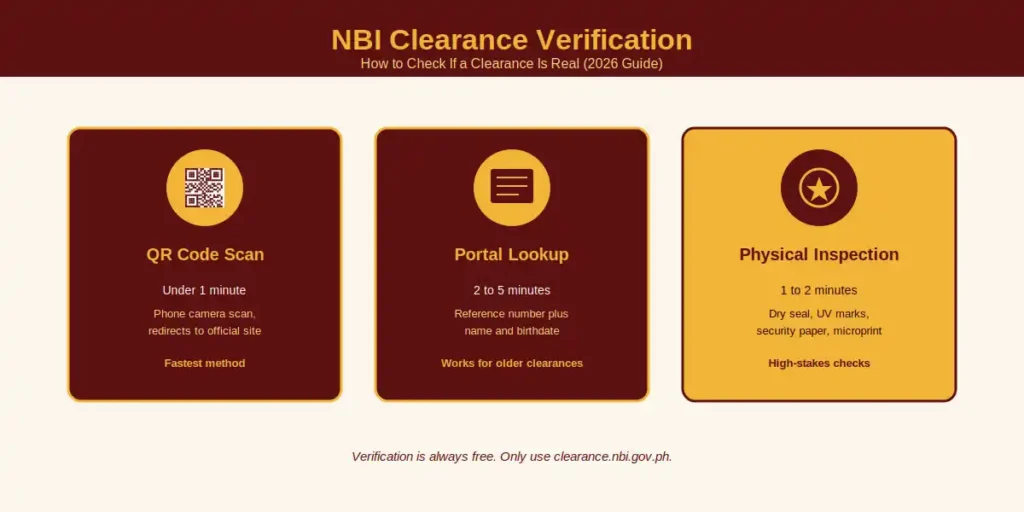
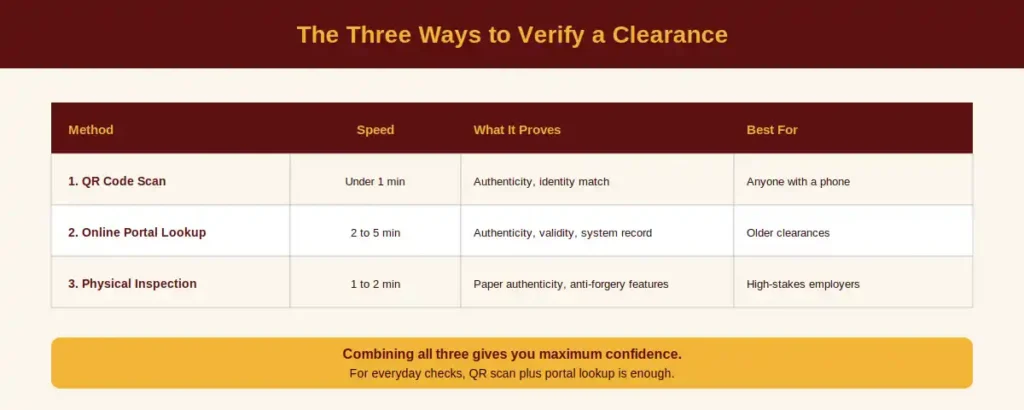
There are three reliable methods, and the strongest verification combines all three. You do not have to use them in order, though scanning the QR code first is the fastest path.
Method | Speed | What It Proves | Best For |
|---|---|---|---|
1. QR Code Scan | Under 1 minute | Document authenticity, identity match | Anyone with a phone |
2. Online Portal Lookup | 2 to 5 minutes | Authenticity, validity, system record | Older clearances without QR codes |
3. Physical Inspection | 1 to 2 minutes | Paper authenticity, anti-forgery features | High-stakes employers, embassies |
Method 1: Scan the QR Code
The fastest and most reliable way to verify a modern NBI Clearance is to scan the QR code printed on the document. Every clearance issued from July 2020 onwards carries a unique QR code that links directly to the NBI verification database.
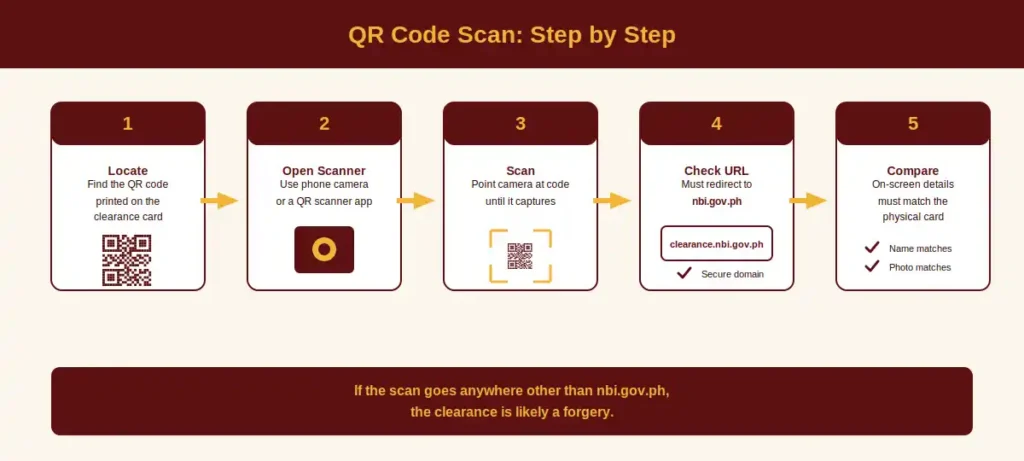
Step-by-Step QR Code Scan
- Locate the QR code. It is printed on the clearance, typically on the upper or lower portion of the card.
- Open a QR scanner. Use your phone’s built-in camera (most modern iOS and Android phones detect QR codes automatically) or any QR scanner app.
- Point and scan. Hold the camera steady over the QR code until it captures the data.
- Check the URL. A genuine scan should redirect to a secure nbi.gov.ph domain. If it goes anywhere else, the clearance is suspicious.
- Compare the on-screen details to the physical card. The digital record should show the same name, birthdate, photo, reference number, and issue date as the physical clearance in your hand.
- Confirm validity. The digital version will display the validity dates. If the clearance has expired, it is no longer valid even if it is otherwise authentic.
If the QR code does not scan, scans to a non-NBI website, or shows details that do not match the physical document, treat the clearance as a likely forgery.
Method 2: Verify Online Through the NBI Portal
This method works for both modern clearances and older ones issued before the QR code system was introduced. It also works as a backup when the QR code is damaged or unreadable.
Step-by-Step Online Verification
- Open a web browser on any phone, tablet, or computer.
- Go to the official NBI website, clearance.nbi.gov.ph. Never use search-result ads or social media links, since fake lookalike sites exist to steal personal data.
- Find the verification section on the portal. Look for Verification or Verify Clearance in the menu or homepage.
- Enter the clearance details. You will typically need the NBI reference number (a 10 to 12 digit code, often formatted like NBI-2025-XXXXXX), the applicant’s full name as printed on the clearance, and the applicant’s date of birth.
- Submit and wait. The system takes a few seconds to a minute to cross-check against the NBI database.
- Read the result. A valid clearance returns confirmation with matching personal details. An invalid result means either the data was entered incorrectly, the clearance has expired, or the document is fraudulent.
If the result shows “invalid” and you are sure you typed the details correctly, the clearance may be fake. Move on to physical inspection (Method 3) before drawing a final conclusion.
Method 3: Physical Security Features
This is the method employers, embassies, and embassies-in-doubt fall back on when digital methods are inconclusive. The NBI prints clearances on specialized security paper with features that are extremely hard to replicate.
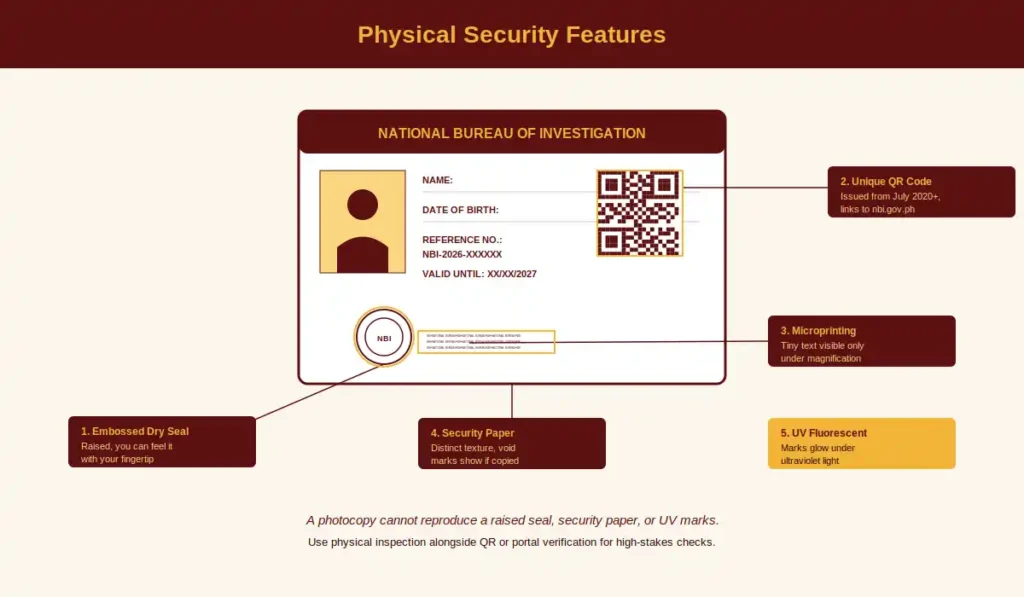
A genuine NBI Clearance has all of the following:
- Security paper. The paper has a distinct texture and contains “void” features that appear if the document is photocopied. A copied clearance will show faint warning words that are not present on the original.
- Embossed dry seal. A raised seal pressed into the lower portion of the clearance. You should feel it with your fingertip. A photocopy or printout cannot reproduce a raised seal.
- Microprinting. Certain lines on the document are made of tiny text that looks like a regular line to the naked eye but becomes readable under magnification. Forgeries usually fail to reproduce microprinting.
- UV fluorescent marks. Under ultraviolet light, specific security marks and fibers in the paper glow. Standard printer paper does not.
- Crisp machine printing. All text and the photo are machine-printed, not handwritten. Handwritten entries are an immediate red flag on any clearance issued in the modern system.
- A unique QR code (on clearances issued from July 2020 onwards).
- A reference number, photo, full name, date of birth, address, and validity dates all clearly printed and consistent.
For most everyday checks the QR code plus an online portal lookup is enough. Physical inspection becomes important when the stakes are high (sensitive employment, large transactions, visa decisions) or when the digital methods raise doubts.
What to Do If Verification Fails
If your scan, your portal lookup, or your physical inspection raises any of these flags, treat the clearance as unverified until proven otherwise:
- The QR code scans to a non-NBI website or fails to scan entirely
- The online portal returns “invalid” or “no record found”
- The name, birthdate, or photo on the digital version differs from the physical card
- The paper looks ordinary, with no security features
- The dry seal is missing or flat (just printed, not embossed)
- The clearance has expired
- The reference number format does not match the standard 10 to 12 digit pattern
Next steps:
- Recheck your data entry. Typos in the reference number or birthdate are the most common cause of false invalid results.
- Try a different method. If the QR code fails, do the online portal lookup. If that fails, try physical inspection.
- Ask the applicant for the original. A photocopy or PDF cannot be fully verified. Always work from the original document when possible.
- Contact NBI directly. Email support@nbi.gov.ph or call the trunkline at (632) 8524-8231 to 38 with the reference number and your concern.
- Do not proceed with employment, tenancy, or any decision that depends on the clearance until verification succeeds.
For Employers: Verifying a Candidate’s Clearance
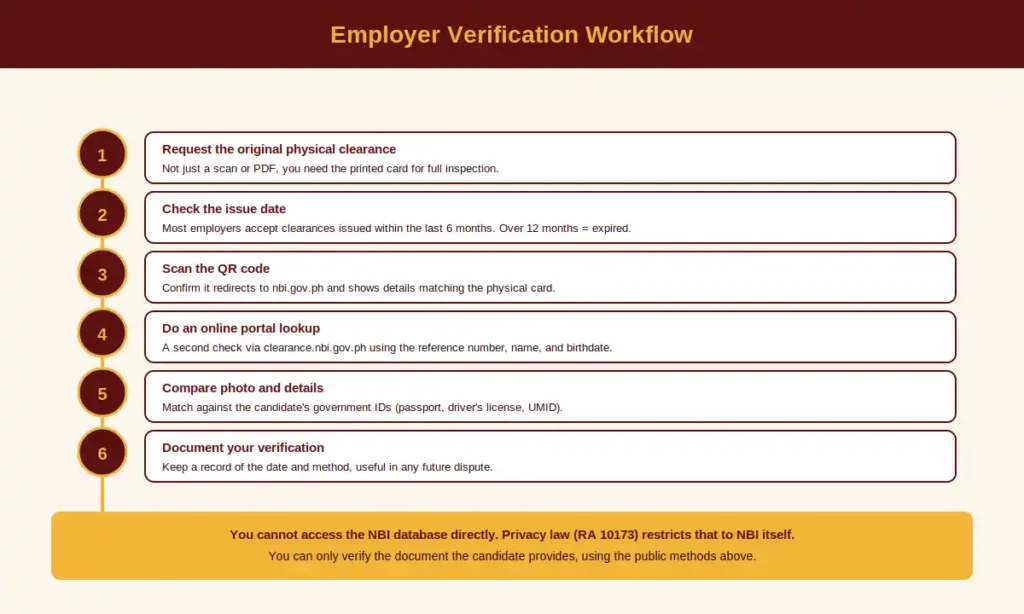
If you are screening a new hire, you are not allowed to access the NBI database directly. Philippine privacy law (the Data Privacy Act of 2012, RA 10173) restricts that level of access to NBI itself. What you are allowed to do is verify the clearance document the candidate hands you, using the same public methods anyone else can use.
Recommended Employer Verification Workflow
- Request the original physical clearance from the candidate (not just a scan or PDF).
- Check the issue date. Most employers accept only clearances issued within the last six months. Anything older than twelve months is expired.
- Scan the QR code with your phone. Confirm it redirects to an nbi.gov.ph URL and shows details matching the physical card.
- Do an online portal lookup as a second check, using the reference number, name, and birthdate from the document.
- Compare the photo and details to the candidate’s government-issued IDs (passport, driver’s license, UMID).
- Document your verification. Keep a record showing you performed the check, including the date and method, in case of future disputes.
Skipping verification is not just a quality issue. Under Philippine law, accepting a falsified clearance without due diligence can create civil liability for employers, especially in sensitive sectors like security, finance, healthcare, and child care.
For Applicants: Verify Your Own Clearance After You Receive It
Most applicants assume that once the clearance is in their hand, the process is over. That is a mistake. Verifying your own clearance immediately after you receive it catches problems before you submit the document to an employer, embassy, or government office.
Check the following on your own clearance:
- Spelling of your full name. A single letter off can cause embassy rejection or HR mismatch.
- Date of birth. Easily mistyped at the booking stage and equally easy to fix early.
- Photo. Make sure it is yours, properly oriented, and clearly visible.
- Reference number and issue date. Save both somewhere safe in case you need to verify or replace the clearance later.
- Validity dates. Note the expiry date so you know when to renew.
- QR code function. Scan it yourself with your phone. If your own QR code does not work, contact NBI before anyone else discovers the issue.
If you find an error, see [LINK: name-correction-guide] for the name correction process or contact NBI to file a rectification request under Section 16 of the Data Privacy Act.
Spotting a Fake NBI Clearance: Common Red Flags
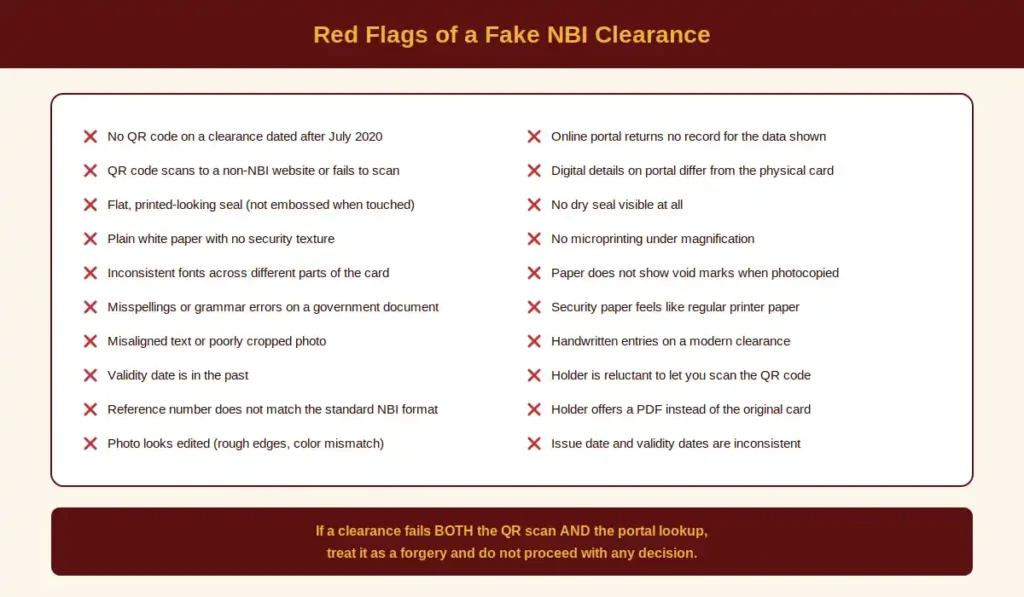
Forgeries range from amateur to convincing. The most common giveaways:
- No QR code on a clearance dated after July 2020
- QR code that scans to a non-NBI site or to nothing
- Flat, printed-looking “seal” instead of an embossed dry seal
- Plain white paper with no security texture
- Inconsistent fonts, where parts of the text look like a different printer or typeface
- Misspellings or grammar errors on a government document
- Misaligned text or poorly cropped photo
- Validity date in the past but the document is being submitted as “current”
- Reference number that does not match the NBI format (typically NBI-YYYY-XXXXXX with 10 to 12 digits)
- Photo that looks edited, with rough edges, color mismatches, or unnatural lighting
- Online portal lookup returns no record for the reference number plus name plus birthdate combination
A genuine clearance will pass at least the QR scan and the portal lookup. If a clearance fails both, you have very strong grounds to treat it as a forgery.
Legal Consequences of Using a Fake NBI Clearance
This is not a small risk. Under the Revised Penal Code of the Philippines, presenting a falsified public document is a criminal offense. Penalties can include:
- Imprisonment ranging from approximately two to six years (the specific range depends on the article applied)
- Significant fines
- Permanent blacklisting from obtaining a legitimate NBI Clearance in the future
- Administrative sanctions, including blacklisting from government service or professional licensure
- Civil liability for any harm caused to third parties who relied on the forged document
For employers, accepting a falsified clearance without due diligence can also lead to civil liability under Article 2176 of the Civil Code (quasi-delict), especially if the employee later causes harm.
The penalties are heavy enough that no employment, visa, or transaction is worth the risk. If you have any doubt about a clearance, verify it before accepting it. If you have been handed a fake clearance, do not pass it along, return it and request a genuine one.
Old vs New Clearance Formats
If you are verifying an older clearance, the rules are slightly different. The NBI Clearance has evolved over the years:
- Clearances issued before July 2020 generally do not have a QR code. They are still valid until their expiry date, but they cannot be machine-verified by scanning. Use the online portal lookup with the reference number, name, and birthdate to verify them.
- Clearances issued from July 2020 onwards carry the modern QR code and can be scanned for instant verification.
- Pre-2014 paper clearances are rare today and would generally be expired. If you encounter one being presented as “current,” that is itself a red flag.
A missing QR code on an older clearance is not by itself a sign of forgery, but it does mean you must fall back on the portal lookup and physical inspection.
Verification Is Always Free
A common scam involves websites or “agents” charging a fee to verify a clearance. Verification is a free public service from the NBI. You should never pay to verify a clearance, whether your own or someone else’s.
If a site asks for money to “verify” or “validate” your clearance, it is not the official NBI portal. The only safe verification routes are:
- The official portal at clearance.nbi.gov.ph
- Scanning the QR code with your own phone
- Physical inspection of the document yourself
Be especially careful of fake portals that mimic the NBI design. The official URL ends in .gov.ph. Anything ending in .com, .net, or .ph (without .gov) is not the official site.
Common Verification Problems and How to Fix Them
Problem 1: The QR Code Will Not Scan
Causes: The QR code is dirty, scratched, faded, or the camera is having trouble focusing.
Fixes: Wipe the surface of the clearance gently with a clean cloth. Try better lighting. Use a different phone or QR scanner app. If it still fails, switch to online portal verification with the reference number.
Problem 2: Portal Returns “Invalid” or “No Record Found”
Causes: Typos in the reference number, name, or birthdate. The clearance may also be too new and not yet synced.
Fixes: Recheck every character of your input against the physical clearance. Try again after a few hours if the clearance was issued very recently. If repeated attempts fail, the clearance may be fake.
Problem 3: Details on the Portal Differ From the Physical Card
Causes: The clearance is forged, or the physical card has been altered after issuance.
Fixes: Treat the clearance as unverified. Do not proceed with employment or any transaction. Request a fresh, current clearance from the holder.
Problem 4: The Clearance Looks Real but Has Expired
Causes: The holder is presenting an old clearance hoping it will be accepted.
Fixes: Politely inform the holder that the clearance must be renewed. Renewal is straightforward and inexpensive. For the renewal flow, see [LINK: renewal-page].
Problem 5: The Portal Is Down
Causes: High traffic (typically Monday mornings or lunch hours) or scheduled maintenance.
Fixes: Try again in off-peak hours (early morning or late evening). Switch to QR code scanning if the document is recent. Allow buffer time for any verification tied to a visa or employment deadline.