NBI Clearance Renewal Online 2026
If your NBI Clearance is about to expire or already expired, you do not need to start from zero. The National Bureau of Investigation lets you renew your existing clearance through its online portal, often without ever stepping into a branch.
This guide will walk you through the full renewal process. You will find out who qualifies for online renewal, how much it costs in 2026, what to do if your old clearance number is missing, and the specific cases where you must apply as a new applicant instead of renewing.
For the application process, see complete application guide. For appointment booking, see appointment booking guide. For document requirements, see requirements checklist. For fee details, see fees and payment breakdown. For verification methods, see clearance verification guide. This page focuses only on renewal.
Important: This is an informational guide. We are not affiliated with the National Bureau of Investigation. For the actual application, always use the official portal at clearance.nbi.gov.ph.
What NBI Clearance Renewal Means
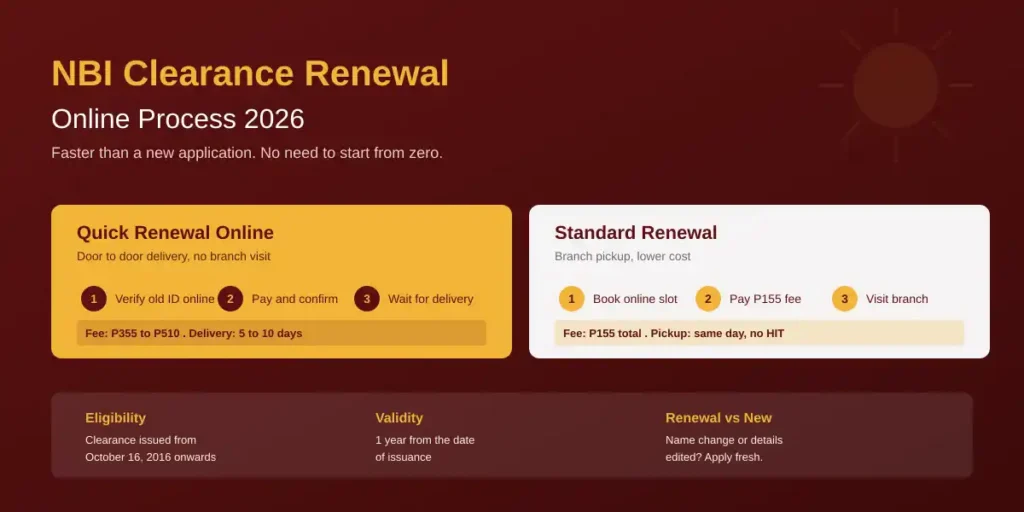
An NBI Clearance is valid for one year only. After 12 months from the date of issuance, the certificate is considered expired and cannot be used for any official transaction. Renewal is the official process of getting a fresh certificate based on your existing record in the NBI database.
The advantage of renewal over a fresh application is simple. Your biometrics, photo, signature, and personal details are already saved in the NBI system. You do not need to repeat the registration, profile completion, fingerprinting, or photo capture. In most cases, you can complete the entire process online and have the new certificate delivered to your address within a few working days.
That said, not everyone qualifies for online renewal. Eligibility depends on when your original clearance was issued and whether any of your personal details have changed.
Who is Eligible for Online Renewal
You can renew your NBI Clearance online if all of the following are true:
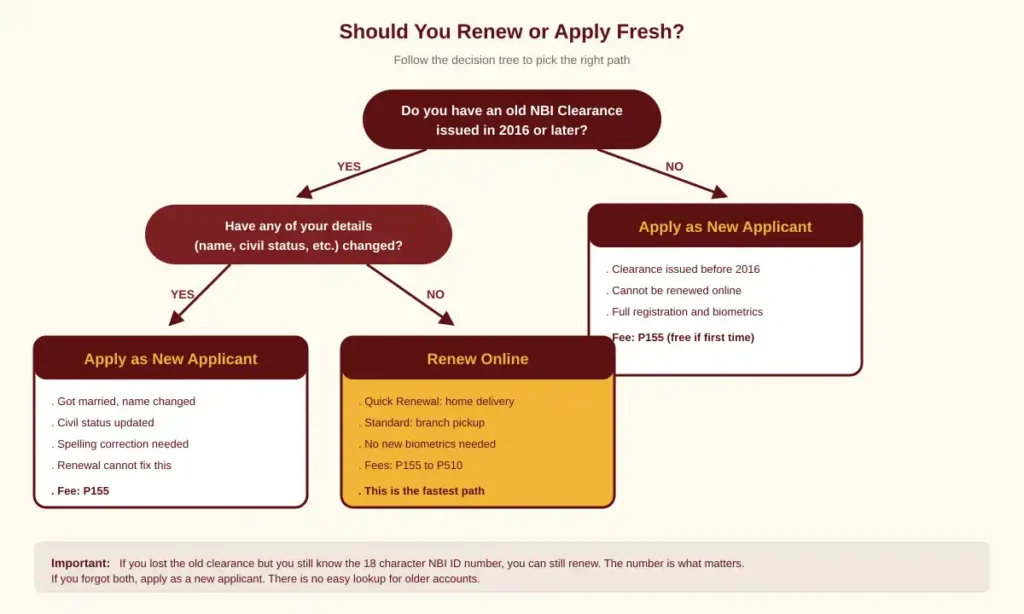
- Your previous clearance was issued on or after October 16, 2016. This is when the NBI moved to its current online system. Clearances issued before this date are not in the new database and cannot be renewed digitally.
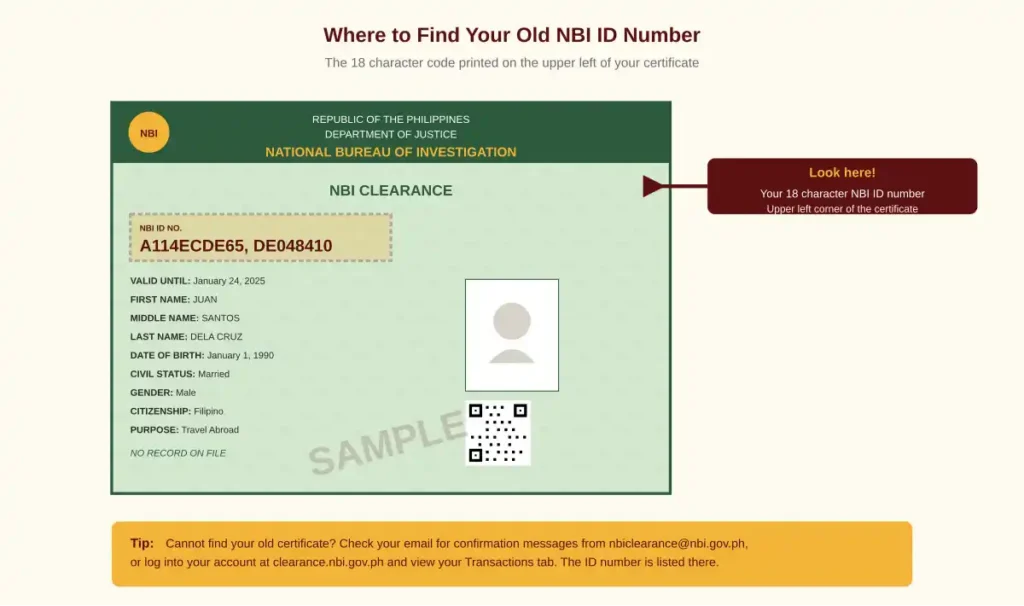
- You have your old NBI ID number. This 18 character code appears on the upper left of your old certificate.
- Your personal details have not changed. This includes your full name, date of birth, civil status, and other identifying information.
- You did not receive a “HIT” status on your last clearance, or if you did, it was already resolved.
If any of these conditions is not met, you will need to apply as a new applicant. We cover that case in the next section.
Note on the 2014 vs 2016 question: Some older guides mention 2014 as the cutoff. That referred to an earlier transition phase. The current rule used by the NBI online portal is October 16, 2016.
Renewal vs New Application (When to Choose Which)
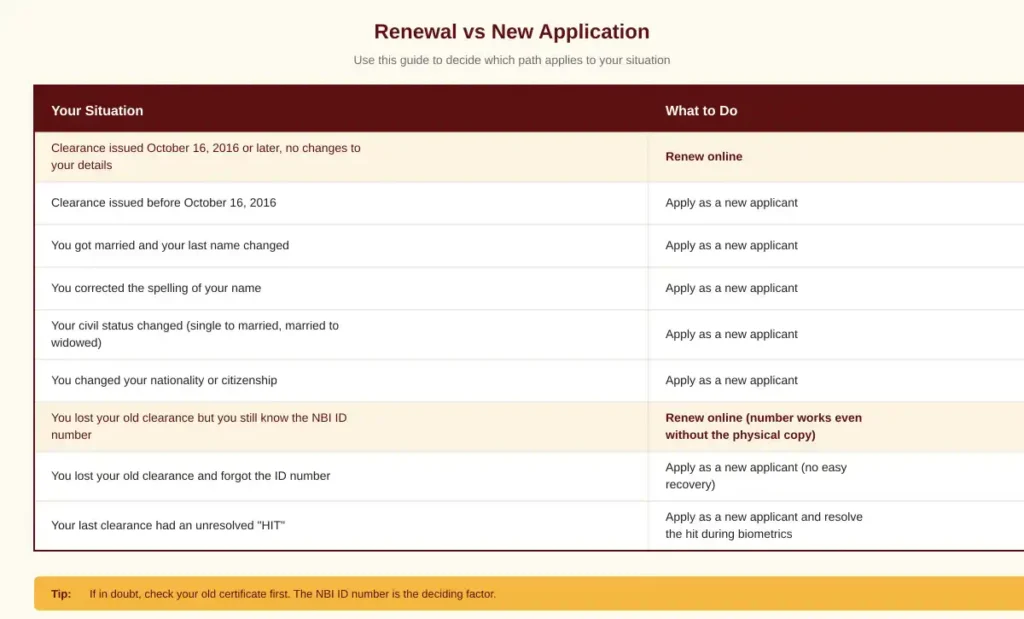
This is the question that confuses most applicants. Use the table below to decide which path applies to you.
For new applications, please follow our complete [LINK: homepage] application walkthrough.
For full requirements specific to your situation, see [LINK: requirements-page].
The Two Renewal Methods Explained
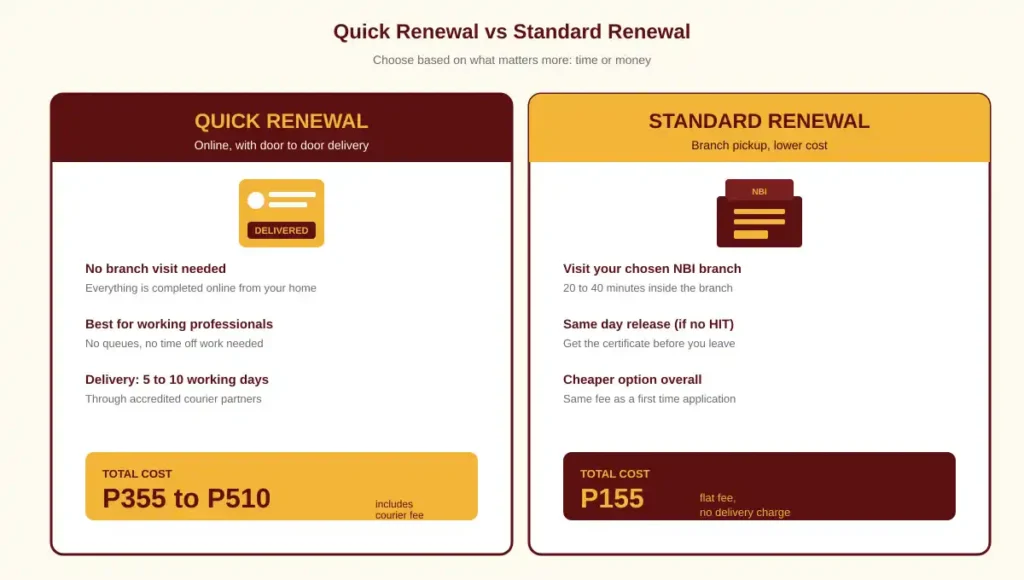
The NBI offers two ways to renew. They differ in cost, convenience, and how you receive the final certificate. Choose based on what matters more to you, time or money.
Method 1: Quick Renewal (Door to Door Delivery)
You complete the entire renewal online. The clearance is delivered to your home or office by a courier partner. There is no need to visit any NBI branch at all.
This is the most convenient option. It is also the more expensive one because the fee includes delivery and a faster processing track. The full breakdown is in the Fee section below.
Method 2: Standard Renewal (Branch Pickup)
You book an appointment at your chosen NBI branch, pay the regular P155 fee, and pick up the renewed certificate yourself. This costs the same as a new application but skips most of the registration steps.
You will still need to appear briefly at the branch for verification, although in many cases biometrics will not be repeated since your data is on file.
Feature | Quick Renewal | Standard Renewal |
|---|---|---|
Branch visit required | No | Yes |
Total cost (2026) | ₱355 to ₱510 | ₱155 |
Processing time | 5 to 10 working days | Same day at branch |
Delivery | To your address | Self pickup |
Best for | Working professionals, OFWs, busy applicants | Applicants near a branch who want to save money |
Step by Step: Quick Renewal Online
This section covers the fully online renewal with home delivery. If you prefer branch pickup, skip to the Standard Renewal section below.
Step 1: Visit the Official NBI Portal
Open your browser and go to clearance.nbi.gov.ph. On the homepage, look for the orange “NBI Clearance Online Renewal” button. It is usually on the upper right side of the page.
The button leads to the renewal entry form. Click it to begin.
Step 2: Locate Your Old NBI ID Number
Before you can submit the renewal form, you need your previous NBI ID number ready. This is the 18 character code printed on your old clearance certificate. Look for it in the upper left corner, just below the title of the document.
The format usually looks like this: A114ECDE65, DE048410 (real numbers vary).
If you cannot find your old clearance, check your email for any NBI confirmation messages from your previous application. The ID number is often included there. We have more recovery options in the Common Problems section below.
Step 3: Fill in the Renewal Verification Form
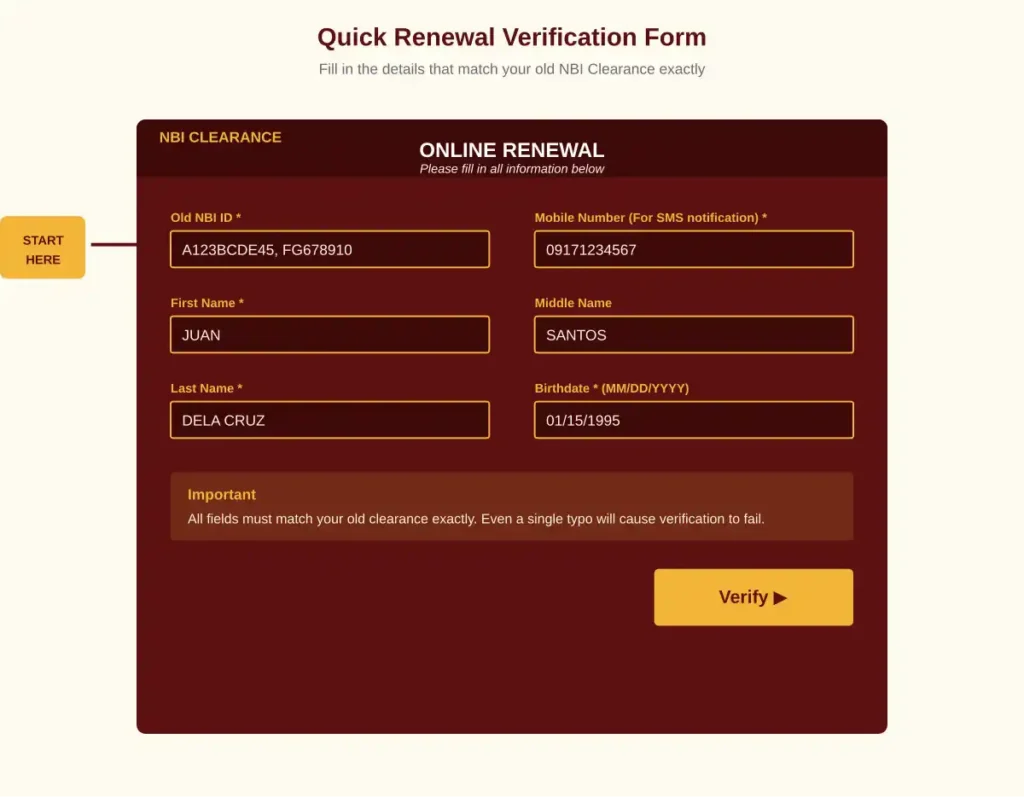
The online renewal form will ask for the following information:
- Old NBI ID (the 18 character code you just located)
- Mobile Number (active number for SMS notification)
- First Name
- Middle Name (optional)
- Last Name
- Date of Birth (in MM/DD/YYYY format)
Double check every field before submitting. Even a single typo in your name or birthday will cause the system to reject your request. After entering all details, click Verify.
If your details match the NBI database, you will be approved for quick renewal in the next screen. If the system does not recognize you, that usually means one of three things: your clearance was issued before October 2016, your information has changed since the last application, or you mistyped a field.
Step 4: Confirm Delivery Address and Purpose
Once verified, the system will display your existing profile information for review. Check that all of it is still correct. If you need to update anything more than a delivery address (for example, your civil status or your last name), the renewal will not go through. You will need to apply fresh instead.
You will then be asked to enter:
- Purpose of clearance (Local Employment, Travel Abroad, Visa, etc.)
- Purpose details (optional, used by some employers)
- Complete delivery address, including Province, City or Municipality, Barangay, Street or Building Number, and Zip Code
The delivery fee depends on your address. Metro Manila addresses are cheapest. Provincial addresses cost more. The system will compute the final amount in the next step.
Step 5: Choose Your Payment Method
After confirming your address, the system shows the total amount due. The base figure starts at P330, with the e-payment service fee of P25 added, plus the delivery fee on top. Total cost typically lands between P355 and P510.
Available payment options include:
- GCash (most popular and fastest to confirm)
- Maya (formerly PayMaya)
- Bank over the counter at Landbank, DBP, and other partner banks
- Online banking through BPI, BDO, Unionbank, and others
- 7-Eleven CLiQQ
- Bayad Center (in store or via app)
- ECPay / MultiPay partner outlets
- Credit or debit card (Visa, Mastercard)
Pick the option you find most convenient. The system generates a payment reference number you must use to complete the transaction.
For a complete breakdown of fees and payment options, see [LINK: fees-page].
Step 6: Complete the Payment
Pay using your chosen channel and the reference number provided. Once payment is confirmed, the renewal goes into processing automatically. You will receive an SMS notification confirming receipt.
Save the reference number in at least two places. Take a screenshot, write it down, or print it. You will need it if there is any issue during processing.
Step 7: Wait for Delivery
After payment, the NBI prepares your renewed clearance and hands it off to a courier partner. Delivery typically takes 5 to 10 working days from the date of confirmed payment.
The courier will deliver the document to the exact address you provided. Make sure someone is available to receive it. If you are not home, the courier may leave a notice or attempt redelivery, depending on the partner.
Tip: Track the delivery using the SMS link you receive after payment. Most courier partners support real time tracking.
Step by Step: Standard Renewal with Branch Pickup
If you live close to an NBI branch or you want to save on the delivery fee, this is the cheaper path.
Step 1: Log into Your Existing Account
If you applied for your previous NBI Clearance online, you already have an account at clearance.nbi.gov.ph. Log in using the email address and password you used during your last application.
Forgot your password? Use the “Forgot Password” link on the login page. The reset link will be sent to your registered email.
Step 2: Select Clearance Renewal from the Dashboard
After logging in, you will see your dashboard. Look for the option labeled “Clearance Renewal” or “Renew NBI Clearance” and click it. Enter your old NBI ID number when prompted.
Step 3: Verify Your Information
The system will display your saved profile. Review every field carefully, especially the spelling of your name and your date of birth. If everything still matches your current situation, click Apply for Clearance to proceed.
If anything has changed, do not push through with renewal. Cancel and start a fresh application instead. Renewing with outdated information will result in a clearance that does not match your current ID, which will cause problems later when you submit it to employers or embassies.
Step 4: Select Your Branch and Appointment Slot
You will be redirected to the appointment scheduler. Choose your preferred NBI branch from the dropdown menu and pick an available date and time slot.
Slots in Metro Manila branches fill up fast. Try mall satellite offices (Robinsons Galleria, SM City North EDSA) or provincial branches if the main UN Avenue location is fully booked.
For a complete list of branches and how to book, see [LINK: appointment-page].
Step 5: Pay the P155 Renewal Fee
The standard renewal fee is the same as a new application: P155 total. This includes the P130 base fee and the P25 e-payment service fee.
Pay through any of the channels listed in the Quick Renewal section above. GCash is the fastest option. After payment, save the reference number and download or print your appointment slip.
Step 6: Attend Your Appointment
On the day of your appointment, arrive at the branch at least 30 minutes before your scheduled time. Bring with you:
- Your old NBI Clearance (the physical certificate, even if expired)
- Two valid government issued IDs (the same ones you registered with)
- Your printed appointment slip with the reference number
At the branch, you will go through a short verification process. In most cases, biometrics will not be repeated since your fingerprints and photo are already on file. The whole branch visit usually takes 20 to 40 minutes.
Step 7: Receive Your Renewed Clearance
If your record is clean, the renewed clearance is printed and released on the same day, often within 30 minutes after verification. If there is a HIT (name similarity with another record), you will be asked to return after 5 to 10 working days.
For more on what HIT means and how it works, see our [LINK: homepage] main guide.
NBI Renewal Fee Breakdown 2026
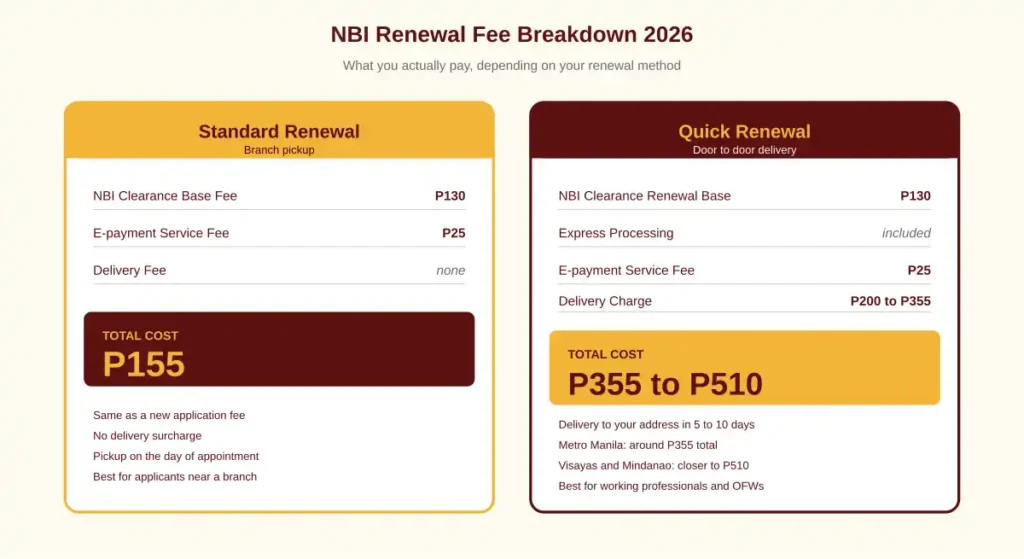
This is the section most renewal guides get wrong. The cost depends entirely on which renewal method you choose. Here is the exact breakdown for 2026.
Standard Renewal (Branch Pickup)
Standard Renewal (Branch Pickup)
Item | Amount |
|---|---|
NBI Clearance Base Fee | ₱130 |
E-payment Service Fee | ₱25 |
Total | ₱155 |
This is the same fee as a brand new application. There is no extra cost for branch pickup renewal.
Quick Renewal (Door to Door Delivery)
Item | Amount |
|---|---|
NBI Clearance Renewal Base | ₱130 |
Express Processing | Included |
E-payment Service Fee | ₱25 |
Delivery Charge | ₱200 to ₱355 (varies by location) |
Item | Amount |
|---|---|
Total Range | ₱355 to ₱510 |
The delivery component is the variable. Metro Manila addresses typically pay around P355. Visayas and Mindanao addresses pay closer to P510, sometimes higher for remote areas.
Special Cases
- First time job seekers under Republic Act 11261 can claim a fresh NBI Clearance for free. However, this benefit applies only to first time applicants, not renewals. If you have used the benefit before, you must pay the regular fee.
- Foreigners renewing in the Philippines pay the same standard fee. Additional document submission may be required (see the foreigners section below).
- OFWs renewing from abroad through a representative pay the same fee plus international courier costs.
Documents Required for Renewal
For renewal, you need significantly fewer documents than a first time application. The standard checklist:
For Quick Renewal (Online)
- Old NBI ID number (typed into the form, no physical copy needed if you have the number)
- Active mobile number
- Complete delivery address
- Payment method (GCash, bank account, debit card, etc.)
For Standard Renewal (Branch Pickup)
- Old NBI Clearance certificate (physical copy, even if expired)
- Two valid government issued IDs (same ones you used in the previous application)
- Printed appointment slip with reference number
- Payment receipt or confirmation screenshot
Accepted Valid IDs
The same IDs accepted for new applications also work for renewal:
- Philippine Passport
- Philippine National ID (PhilSys)
- Driver’s License
- UMID Card
- GSIS e-Card
- PhilHealth ID (PVC plastic card only)
- Pag-IBIG Loyalty Card
- Voter’s ID or Voter’s Certification
- PRC ID
- Senior Citizen ID or PWD ID
- Postal ID (PVC plastic only)
- PSA authenticated Birth Certificate (as supporting)
Company IDs, barangay clearances, and paper laminated IDs are not accepted. For the complete list of accepted and rejected IDs, see [LINK: requirements-page].
Where to Find Your Old NBI ID Number
The 18 character NBI ID number is your key to online renewal. Here is exactly where to look.
On the Physical Certificate
Take out your old NBI Clearance and look at the upper left corner, right below the heading “Republic of the Philippines, Department of Justice, National Bureau of Investigation.”
The label says “NBI ID NO.” followed by the unique code. The format usually looks like this: a letter, several digits, a dash, more letters and digits. Example pattern: A123BCDE45, FG678910.
Write this number down exactly as it appears. Even one wrong character will fail verification.
If You Cannot Find Your Old Certificate
You have a few options:
- Check your email inbox. Search for messages from “nbiclearance@nbi.gov.ph” or “clearance.nbi.gov.ph”. The NBI sends a confirmation email after every successful application that includes the ID number.
- Log into your NBI account. If you can remember your registered email and password, log in at clearance.nbi.gov.ph and check your Transactions tab. Past clearances and their ID numbers are listed there.
- Contact the NBI Help Desk. Email nbiclearance@nbi.gov.ph with proof of identity (a clear photo of your valid ID) and request your previous ID number. Response time is usually 2 to 5 working days.
- Visit your last NBI branch. Bring two valid IDs and ask the help desk to look up your record. They can retrieve the ID number on the spot in most cases.
If none of these work, you will need to apply as a new applicant. The good news: a new application will give you a fresh NBI ID that you can use for future renewals.
For the full lost clearance recovery process, see [LINK: lost-clearance-page].
Renewing from Abroad (OFW Guide)
Filipinos working overseas can renew their NBI Clearance without flying back to the Philippines. The process is different from the local renewal, and you will need someone you trust in the country.
Who Qualifies
You can renew from abroad if your previous NBI Clearance was issued on or after October 16, 2016, and your personal details have not changed.
If your last clearance is older than this, you cannot renew. You will need to apply fresh through the Philippine Embassy or Consulate nearest to where you live.
What You Need
Prepare the following documents before starting:
- Two recent passport sized photos (white background)
- Photocopy of the data page of your valid passport
- Photocopy of your old NBI Clearance (or just the ID number if you lost the physical copy)
- Signed authorization letter or Special Power of Attorney appointing your representative in the Philippines
- Photocopies of both your ID and your representative’s ID
Step by Step Process
- Download the NBI Clearance Application Form from the official portal at clearance.nbi.gov.ph, or get a copy from the Philippine Embassy or Consulate.
- Fill out the form completely with your current information.
- Have a trusted friend or family member act as your representative. They will handle the in country steps for you.
- Courier the filled form, photocopies, and your old clearance to your representative.
- Your representative submits everything at the NBI Main Office in Ermita, Manila, or at your designated branch. They will pay the renewal fee on your behalf.
- NBI processes the renewal. This takes 7 to 15 working days for mailed clearances.
- Your representative receives the renewed clearance. They can either courier the original document to you abroad or send a scanned copy first for urgent submission, with the original to follow by mail.
Mailing Address for Overseas Applicants
If you do not have a representative, you can mail the documents directly to:
Ms. Sandra P. Sobida
IRD, Mailed Clearance Section
National Bureau of Investigation
Taft Avenue, Ermita 1000 Manila, Philippines
Use registered international mail or a tracked courier service. Processing of mailed renewals takes 10 to 20 working days from the date NBI receives your documents.
For more details specific to OFW renewal, see [LINK: ofw-page].
Renewal for Foreigners in the Philippines
Foreign nationals living in the Philippines, including expats, dual citizens, and long term residents, can renew their NBI Clearance through the same portal.
Additional Requirements for Foreigners
In addition to the standard renewal documents, foreigners must present:
- Alien Certificate of Registration (ACR I-Card) issued by the Bureau of Immigration
- Valid passport (original and photocopy of the data page)
- Old NBI Clearance (or the ID number if you lost it)
Process for Foreigners
The renewal process is the same as for Filipino citizens. You can choose either Quick Renewal with delivery or Standard Renewal with branch pickup. The fee is identical: P155 for pickup, P355 to P510 for delivery.
Some foreigners may be asked to provide additional documents at the branch, especially if their immigration status changed since the last clearance. Bring the ACR I-Card, passport, and any updated immigration documents to be safe.
Renewal Processing Time and Delivery
How long the renewal takes depends entirely on which method you chose.
Method | Total Time |
|---|---|
Standard Renewal, branch pickup, no HIT | Same day, 30 minutes inside the branch |
Standard Renewal, branch pickup, with HIT | 5 to 10 working days |
Quick Renewal, Metro Manila delivery | 5 to 7 working days |
Quick Renewal, provincial delivery | 7 to 12 working days |
Quick Renewal, with HIT triggered | 10 to 15 working days |
Renewal from abroad through representative | 10 to 20 working days |
Renewal from abroad by direct mail | 15 to 30 working days |
What Happens If You Get a HIT During Renewal
A HIT during renewal is rare since your record is already in the system, but it can still happen if your name matches a new entry added since your last clearance. In that case, you will be contacted by the NBI for verification.
The HIT clearance process during renewal is the same as during a new application. The NBI investigator will manually check both records and clear the false match within 5 to 10 working days. If the hit is genuine, you may need to coordinate with the court or an attorney.
For full HIT details, see our [LINK: homepage] main guide.
Validity of the Renewed Clearance
A renewed NBI Clearance is valid for one year from the date of issuance, same as a fresh clearance. The validity period does not stack. If your old clearance expired three months ago and you renew today, your new clearance is valid for one year starting today, not 15 months.
This is why many applicants prefer to renew before the old certificate expires. The new validity period begins on the day NBI processes the renewal, so renewing early does not lose you any time as long as you renew on or close to the expiry date.
When Employers Want a Recently Issued Clearance
Some employers, embassies, and government agencies prefer a clearance issued within the last three to six months. If you are submitting it for a visa or for a job that requires recent documents, check the requirement first. A clearance issued nine months ago is technically still valid, but it may not be accepted.
Common Problems During Renewal
These are the issues applicants most often run into during the renewal process, with practical solutions for each.
1. The System Cannot Verify Your Old NBI ID
This is the most common issue. Possible causes:
- Your clearance was issued before October 16, 2016 (not eligible for online renewal)
- You typed the ID number incorrectly (very common, especially with similar looking characters like 0 and O, or 1 and I)
- Your personal details (name spelling, birthday) do not match what NBI has on file
Solution: Try again, carefully checking each character. If it still fails, you will need to apply as a new applicant.
2. You Lost Your Old NBI Clearance and ID Number
You cannot complete online renewal without the ID number. Recovery options are listed in the Find Your Old NBI ID section above. If none of them work, apply as a new applicant.
3. Payment Was Made But the System Did Not Update
Payment confirmation delays happen, especially over the weekend or holidays. The system typically updates within 24 hours. If after 24 hours the payment is still not reflected:
- Take a screenshot of your payment confirmation
- Email nbiclearance@nbi.gov.ph with the reference number and proof of payment
- Wait 2 to 3 working days for a response
4. Your Name on the Old Clearance Has a Spelling Error
If the error existed on your last certificate, renewing will produce a new certificate with the same error. To correct it:
- Apply as a new applicant, not as a renewal
- Bring documents proving your correct name (PSA birth certificate, valid IDs)
- The correction is done during the new biometric capture, not online
5. You Need the Clearance Urgently and Quick Renewal is Too Slow
The 5 to 10 working day delivery window is not flexible. If you need the clearance faster:
- Skip Quick Renewal and book a Standard Renewal with same day branch pickup
- Choose a mall satellite office instead of the main branch (shorter queues)
- Arrive at opening time on Tuesday, Wednesday, or Thursday (off peak days)
6. The Delivery Address Field Will Not Accept Your Address
The NBI delivery system has strict address format requirements. Make sure each field is filled:
- Province must be selected from the dropdown
- City or Municipality must match the official LGU name
- Barangay must be exact (no abbreviations)
- Street and number should be complete
- Zip code is required and must be valid
If your address is in a newly developed area or subdivision that the dropdown does not recognize, contact the courier partner directly after payment for manual delivery arrangements.
Tips for a Smooth Renewal
Practical advice from applicants who completed the renewal without delays.
- Renew at least two weeks before your expiry date. This buffer protects you from delays in case of payment issues or system errors.
- Verify your old NBI ID number twice before submitting the form. The format is case sensitive and includes characters that can be misread.
- Use GCash for payment. It confirms within minutes and triggers automatic processing on the NBI side. Bank over the counter payments can take 24 to 48 hours to reflect.
- Save the reference number in three places. Screenshot, written note, and emailed copy to yourself. This is your only proof of payment if something goes wrong.
- For Quick Renewal, confirm someone will be home during the 5 to 10 day delivery window. Couriers do not hold packages indefinitely.
- Take a clear photo of your old clearance before sending it anywhere. If lost in transit during OFW renewal, the photo serves as a backup reference.
- Avoid renewing during the last week of December and the first week of January. Holiday delays can stretch processing by an additional 5 to 10 days.
- If your old clearance is damaged or faded, photograph the ID number clearly first, then proceed. The NBI does not require the physical document for Quick Renewal, only the ID number.